
Plan and refine a route
Add addresses, choose how you travel, and understand the calculated stop order.
Add your start and stops
- Open Route Planner while signed in.
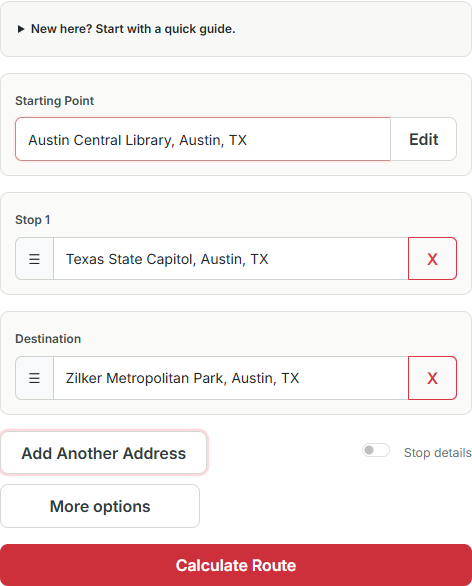
- Enter your Starting Point. If the field is locked, select Edit first.
- Enter the next address and select an address suggestion when available. Include the city and state or country for places with similar names.
- Use Add Another Address for more stops. The planner supports up to 20 total addresses, including the start and final destination.
- Put your desired final destination last, then select Calculate Route.
The first and final addresses are the endpoints. The planner requests an optimized order for the stops between them; supported results depend on the travel mode and mapping service.
Choose travel settings
Open More options → Settings to choose your travel mode and miles or kilometers. Available modes include driving, walking, bicycling, and public transit. Mapping services may not support every multi-stop combination; if a mode fails, split the journey into shorter legs.
For driving, you can request avoiding tolls, highways, or ferries. These are routing preferences, not a guarantee that every such road can be avoided.
Use My Location asks your browser for location access. You can enter an address manually instead. Reverse Route reverses your entered stops and their associated notes and timing fields; calculate again afterward.
Add notes and timing details
Turn on Stop details to add a stop duration, earliest/latest times, and notes where those fields are available. After calculation, review Schedule & Constraints for timing warnings.
Time windows are checked against the calculated order. They do not guarantee a route that meets every appointment. Adjust the order or time allowances and calculate again if the schedule is unsuitable.
Review before setting off
Check the map, listed stops, and directions. Recalculate after changing addresses or route preferences. Compare the result with your original order, then save the journey if you want to return to it.
Route times and distances are estimates. Check parking, access restrictions, road conditions, and the suitability of each stop for your vehicle.
Something still unclear? Get in touch or try troubleshooting.